
Generate campaign-ready images from text prompts
Write a prompt and create visuals for product shots, social posts, ads, thumbnails, blog covers and image-to-video workflows. Stratboost helps you move from text prompt to usable image — then keeps every version saved in your Workspace.
Browse tools publicly, then create a free account and continue with add-on credits or the Stratboost plan when you are ready to generate.

Use text prompts to create images that feed real content workflows
The point is not just to make a nice image. The point is to create visuals you can use across campaigns, content, ecommerce pages and video workflows.

Social and campaign visuals
Generate visuals for posts, stories, ads, banners, hooks and campaign directions without starting from a blank canvas.

Model-backed image creation
Choose the right creative direction for the job instead of forcing every prompt through the same generic setup.
Images that become workflows
Generate a strong visual, save it, reuse it, then turn it into more content through templates, tools and image-to-video.
Most people do not need more blank generators. They need usable visual directions.
A generic image generator can create a one-off picture. But campaign work needs more than that. You need product visuals, social images, ad variations, thumbnails, blog covers and starting points for video.
Stratboost is built for repeatable creative output: prompt the image, generate it, save it, reuse it and turn it into the next asset.
Start from intent
Create images around a product, campaign, audience or content goal.
Create more variations
Test different image directions without rebuilding from scratch each time.
Reuse winners
Save outputs in Workspace so strong visuals do not disappear in downloads.
Move into video
Turn generated images into short videos through image-to-video workflows.
What is a text to image generator?
A text to image generator creates images from written prompts. In Stratboost, you can write a prompt for a product visual, ad creative, social post, thumbnail, blog cover or campaign scene, generate the image, and save it into Workspace so it can be reused in future content.
Generate images for the places your brand actually shows up
Use text-to-image when you need a strong visual direction and want to move quickly from idea to usable asset.
Product visuals
Create product-style images, lifestyle scenes, campaign concepts and ecommerce creative starting points.
Ad creative concepts
Generate visual directions for ads, offers, product launches and campaign testing.
Image-to-video starting points
Create the still image first, then use it as the source for short-form video content.
Blog covers and thumbnails
Create visual assets for articles, guides, videos, YouTube thumbnails and content hubs.
Avatar and character scenes
Generate reusable scenes, character visuals and avatar-friendly creative for social and video workflows.
Template-ready visuals
Create images that can support recurring templates, campaigns and branded content systems.
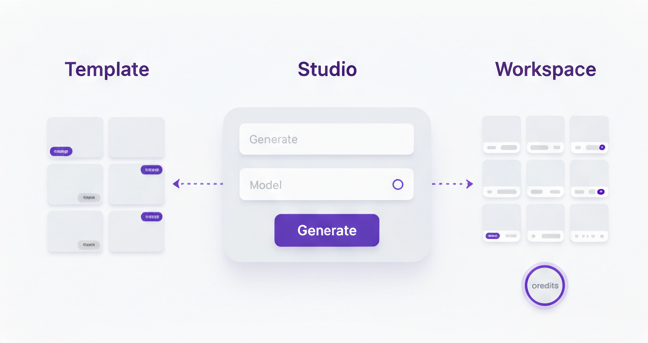
Text to image is the starting point. The workflow is where it becomes useful.
A basic generator gives you an image. Stratboost helps you turn that image into part of a repeatable content system.
-
Start with a prompt. Describe the product, scene, style, audience, use case or campaign direction.
-
Generate visual directions. Create images for ads, ecommerce, social posts, blogs, thumbnails or video starting points.
-
Save every version. Keep generated images in Workspace so you can compare, reuse and remix what works.
-
Turn images into the next asset. Move into image-to-video, AI Video Studio, templates or the wider AI Tools Library.
Built for creators, brands and teams that need visual output
Ecommerce brands
Create product visuals, lifestyle scenes, ad concepts and campaign images without waiting for a full shoot.
Explore ecommerce use caseCreators
Generate visual hooks, thumbnails, character scenes and creative directions for short-form content.
Explore creator use caseAgencies
Create more client visual directions across campaigns, ads, landing pages and content calendars.
Explore agency use caseProduct marketers
Turn a product idea, feature, offer or launch angle into visual concepts you can test and reuse.
Small businesses
Create practical visuals for websites, posts, offers, announcements and ads without complex design tools.
A generator creates an image. Stratboost helps you build a reusable visual system.
The goal is not just to create one image. The goal is to turn more ideas into usable assets, keep outputs organised and make each generation easier to reuse.
Stratboost combines AI tools, studios, templates and Workspace so your text-to-image work does not become another scattered folder of downloads.
What to include in a strong text-to-image prompt
A better prompt gives the model a clearer job. Instead of only describing an object, describe the asset you need, where it will be used and what style or composition matters.
The subject: product, person, scene, offer or visual idea.
The use case: ad, product image, social post, thumbnail, blog cover or video source.
The visual style: clean studio, lifestyle, premium, playful, cinematic, editorial or minimal.
The composition: close-up, hero image, wide layout, text-safe space or vertical social format.
The practical details: lighting, materials, background, colour direction and brand feel.
Build the full creative path around text-to-image
Use this page as the starting point, then move into the right Stratboost tool or workflow for the next asset.
Text to image generator questions
Turn your next prompt into a reusable visual asset
Start with a product idea, campaign angle or content prompt. Generate an image, save it and keep building from it inside Stratboost.